
Useful materials
QR business cards: from paper to a digital contact
One scan saves the name, phone, email and company straight into the phone's address book — no retyping, no lost cards, no guessing which number is the mobile.
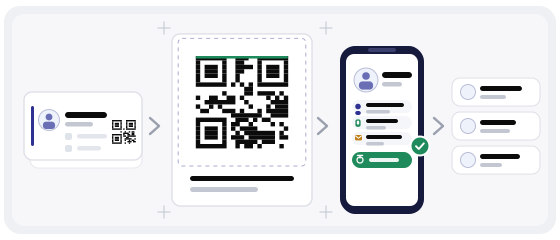
The problem with paper that nobody says out loud
A printed card is not really a way to share contact details. It is a reminder that you met, plus a data entry task the other person will probably postpone.
The usual outcome is a card in a jacket pocket. It survives until the jacket is washed or the desk is cleared, and by then the reason you wanted the follow-up has been forgotten too.
A QR business card does not replace the paper version, and it does not need to. It removes the one step where people give up — the typing.
What actually happens when someone scans
They point the camera at the code. A small prompt appears. They tap it, and the phone offers to add the contact — name, phone, email, company, job title, website.
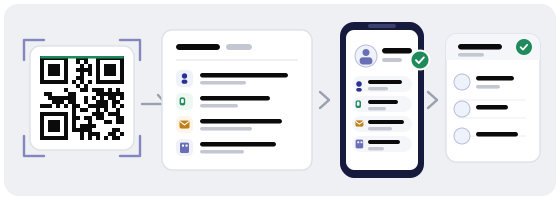
On both iPhone and Android this is a native dialogue, not a web page. That matters: it works with no data connection, because the contact data is inside the code itself.
What follows is the part people underestimate. A saved contact stays in the address book, so when they later search for "plumber" or "translator" or your company name, your name appears. A card in a drawer never does.
Who benefits most
- entrepreneurs
- sales
- consultants
- real estate
- freelancers
- companies
- conferences
- printed cards
The pattern is simple: the more people you meet in a week, and the less time each of them has, the more a code pays off. A conference is the extreme case — fifty introductions in two days, and nobody types anything.
What to put in the contact
Every field you add makes the code denser, and a denser code is harder to scan when printed small. Include what a person would actually use, and leave the rest out.
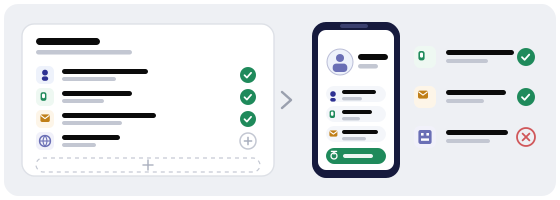
- name — the form people will search for later
- mobile number — one, not three
- email — the one you actually answer
- company
- job title
- website
- address — only if you have a physical location people visit
Resist the temptation to add a fax number, a second office, an ICQ handle or a slogan. Those fields exist in the format, but a card is a first contact, not a database record.
If a field would not change how the person replies, it does not need to be in the code.
Static vCard or dynamic code — the choice that matters later
A static vCard stores everything inside the pattern. It is the most reliable option for printing, but it freezes at the moment of export. Change your phone number two months later and every card already in circulation still shows the old one.
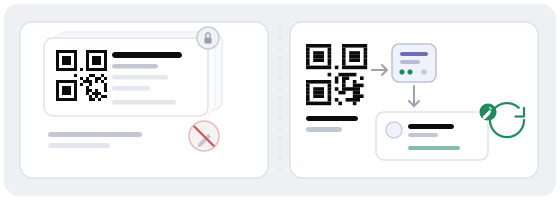
A dynamic code points at a redirect. The contact details live behind that redirect, so you can update them — a new title, a new number, a new employer — without reprinting a single card.
Dynamic
Edit the contact after printing and see how many people scanned. Better for anyone whose details may change within a year.
Static vCard
Works offline with zero dependency, and cannot be edited once printed. Fine for a fixed, permanent contact.
There is one real advantage to the static version worth stating honestly: it survives even if a service goes offline. If your details are genuinely permanent and you want the absolute simplest artefact, it is a legitimate choice. For most people and most businesses, the ability to fix a typo without a reprint wins.
Designing the card so people actually scan it
The most common failure is a beautiful card with a code the size of a postage stamp in the corner. At normal reading distance it simply does not resolve.
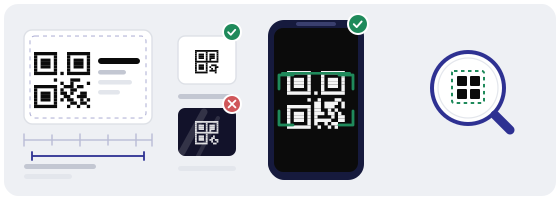
Keep contrast high. Dark modules on a light background is the default for a reason: inverted codes fail on a meaningful share of devices, and you will never learn which ones.
A short label helps more than people expect. "Scan to save my contact" tells the recipient what will happen, which removes the hesitation that stops most scans.
The QR Studio has business card templates that already respect these margins and print resolution, so the code lands at a usable size instead of being squeezed in at the end.
Where else the same code earns its keep
Once the contact code exists, it stops being a business-card feature and becomes a general-purpose handshake.
- on the back of the paper card, at full size
- in an email signature
- on a conference badge or lanyard
- on a slide deck's closing screen
- on a shop counter or reception desk
- on a CV or portfolio PDF
- on a vehicle, van or market stall
The value compounds because it is the same artifact reused, not a new thing to design each time.
Why we only make dynamic codes
We deliberately do not offer static-only codes. After printing, a static code cannot be changed and gives you no statistics — and a contact that cannot be corrected is a liability rather than an asset.
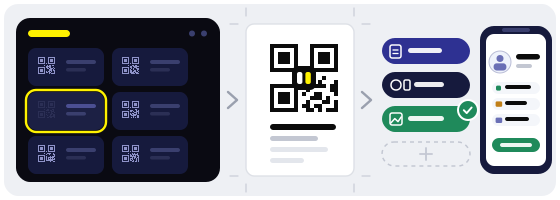
Every code created here is dynamic: the printed pattern points at a short redirect we control, the destination lives behind it, and you can see how many times the code was scanned.
Print once. Update the contact whenever your details change.
Check your own code before the print run
Scan the finished card on at least two phones, and test it at the real printed size rather than zoomed in on a monitor. A code that fills your screen is being read under completely different conditions than one on a card handed across a table.
The QR scanner on this site shows what is inside a code before opening it — useful for verifying your own cards, and essential when a code arrives from someone you have just met.
Build the card itself in the generator in under a minute: pick the contact type, fill the fields, choose the style, download in SVG for print or PNG for email signatures.