
Useful materials
QR menus for cafés and restaurants:two simple ways
Dishes, prices and availability change — a QR points guests to the live digital menu. Update it without reprinting every table sticker.
Why QR menus help
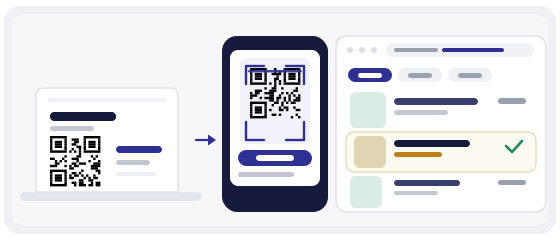
A printed menu is a photograph of a moment. The day you send it to the printer, it is already slightly out of date — and every price change, sold-out dish or seasonal addition costs a full reprint.
A QR code solves a narrower problem than people expect. It does not replace the menu. It replaces the address of the menu. The code is a permanent door; what is behind the door can change as often as you like.
That one difference is what makes it practical. Table stickers, tent cards and window decals are the expensive, inconvenient part of the job — they are also the part that never has to change again.
How it works
The guest does not install anything. They point the camera they already have at the code, tap the link that appears, and the menu opens in their browser.
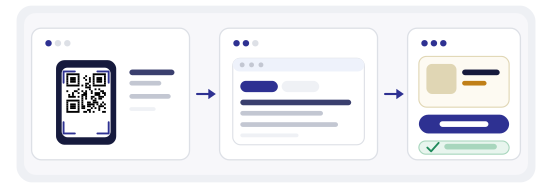
- Table QRvisible
- Scancamera
- Menuopens
The whole interaction is three seconds, and it works on both iPhone and Android without an app.
Two ways to build a QR menu
There is no single correct setup. What matters is that you already have the menu somewhere online — and one of the two options below will almost certainly match what you have today.
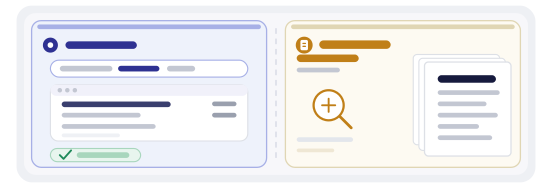
Option 1. A link to your menu on your website
If your restaurant already has a page listing dishes and prices, this is the cleanest option. The QR carries that page's address, so the menu guests see is the same one you maintain for everyone else.
Copy the URL of the menu page — not the homepage, the menu itself — and paste it into the generator. Set the type to link, choose a style, and download.
The advantage is that search engines already index that page, so people who never scan the code can still find you. The QR adds an offline entry point to something that already earns traffic online.
You are putting your venue's own page behind a piece of table furniture — one link, one step, no third-party app in between.
Option 2. A menu file: PDF, image or another document
No website? You do not need one to start. A file is enough.
Make a PDF in Google Docs, Word or Canva, or export a clean image of the menu. Upload it to cloud storage — Google Drive works well — and copy the sharing link. Set the sharing so that anyone with the link can view it, otherwise guests will hit a login wall and give up.
Paste that link into the generator and you have a working QR menu in a few minutes.
One honest caveat about PDFs: they open in a separate viewer, they are awkward to pinch-zoom on a small phone, and they are invisible to search engines. A simple HTML page is friendlier for guests — but a well-made PDF beats no digital menu at all, and it beats a queue at the counter.
Which option should you pick
Website page
Best for readability, search visibility and changing content often. Needs a page you can edit.
File (PDF or image)
Fastest to start with zero web work. Less pleasant to read on a phone and harder to find in search.
A reasonable middle path: start with a file this week so the tables are covered, then move to a real page when you have time. Because the code is dynamic, switching the destination later costs nothing and does not affect a single sticker already in place.
What a good digital menu actually contains
The failure mode of QR menus is not technical — it is a PDF that is just the printed menu photographed at an angle. Guests forgive a lot, but not unreadable text on a 5-inch screen.
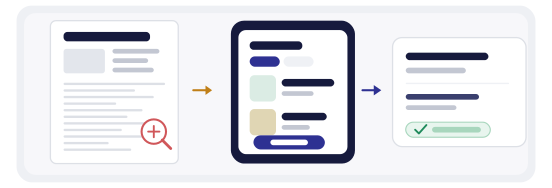
- section headings guests recognise — starters, mains, drinks
- prices in the local currency, no currency codes
- dish names in full, with a short description underneath
- allergen and dietary markers next to the dish, not in a footnote
- current availability — grey out or remove what is finished
- one clear action at the top: call, book, or order
- large enough type to read without zooming
Keep the file or page under roughly two megabytes. Guests on mobile data will not wait, and a menu that takes twelve seconds to load is worse than paper.
Link or file changed? No problem
New prices, a seasonal menu, a different PDF or page — you do not need to reprint stickers.

Sign in to a free account and edit the QR content anytime. The printed pattern encodes a short redirect that we control, and the redirect is what you edit.
The code on the table stays the same. Only the destination changes — completely free.
Why we only make dynamic codes
A static code contains the address itself. Print it with a typo, or point it at a page you later replace, and the only repair is a new print run across every table.
Every code created here is dynamic, so the thing behind the code is editable. You also get scan statistics: how many people scanned, on which day, and roughly from where.
For a restaurant that is genuinely useful data. A code on table four that gets scanned ten times a day and one in the window that gets scanned twice a month tells you where to spend your next print budget.
Premium features — free for your business
With QRcode Global you get a set of tools that usually sits behind a paid plan:
- scan statistics
- edit content anytime
- change QR style
- compare QR codes
- download analytics for your reports
- scan map
- and much more — all in your account, free
Your venue gets a modern tool without extra cost or complexity.
Placement and size
A QR menu lives on a table, so it is scanned from close range and from a seated angle. That makes it forgiving — but only if you respect two basics: contrast and physical size.
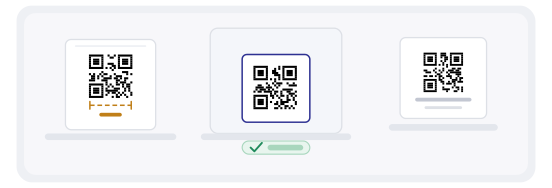
- visible without moving the cutlery
- large enough for the viewing distance
- high contrast — dark pattern, light background
- flat surface, no glare from a spot light
- easy to reach while seated
- survives a wipe with a damp cloth
The QR Studio has ready templates laid out for exactly these formats, so the sizing and margins are already correct before you send anything to print.
Wording that makes people actually scan
An unlabelled square is a puzzle. A labelled one is an instruction — and the label does most of the work.
Keep it to a short line placed directly next to or above the code. "Menu" alone is weaker than "See the full menu". Anything longer than a few words competes with the code for attention.
"Want the latest menu? Scan the QR."
If your guests are mostly tourists, add the same line in English underneath. Two short lines beat one long one.
Paper menus can stay
QR does not have to replace print — it can sit alongside it. Some guests prefer paper, some have a flat battery, and some simply do not want to use a phone at dinner.
Keeping a small stack of printed menus behind the bar costs almost nothing and removes the single biggest complaint about QR-only venues: that they feel like a barrier rather than a service.
The practical version most restaurants land on is paper for the main course, QR for everything that changes — daily specials, the wine list, allergens, translations.
Check the codes before the season starts
Before a new set of table tents goes out, scan each one on a real phone, in the real lighting, from a seated position. Do it for every table layout you use — a code that reads perfectly on the bar counter can fail against a dark tablecloth.
The QR scanner on this site shows you the destination before opening it, which makes spot-checking a stack of printed pieces much faster than tapping through them one by one.